
Context & mentions
How LocalPilot fits large tasks into small context windows, and how to attach exactly the context you want.
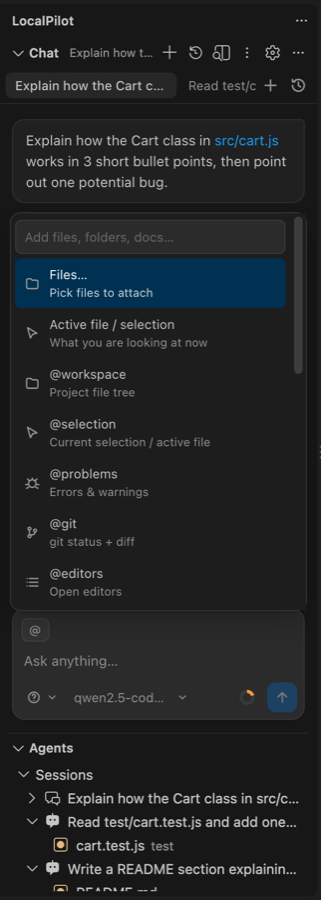
Attaching context
| How | What it does |
|---|---|
| Paper-clip button | Attaches the active file, or just the selection as file#L10-L20 |
| Folder button / drag-and-drop / Explorer menu | Attaches arbitrary files (images become image attachments) |
@path/to/file or @path/to/file#L10-L40 |
Inline file reference with autocomplete of open editors |
@folder/ |
Attaches a directory listing |
@workspace |
Project file tree (truncated at 400 entries) |
@selection |
Current selection, or the whole active file |
@problems |
Current errors and warnings from language servers |
@git |
git status, unstaged diff stat and the staged diff |
@editors |
List of open editors |
Type @ to open the mention picker; ↑/↓ and Tab to pick.
The context meter
The ring at the bottom-right of the composer shows how much of the model’s window is in use. It turns amber at 65% and red at 85%. Click it to compact immediately (/compact does the same).
What is always in the prompt
Besides your message and the conversation, every call carries a few compact sections so the model can orient itself before its first tool call: the active file and selection, a project map (top-level folders with file counts and their subfolders, root files, detected stack markers such as Node / Python / Docker), any project rules files, the memory index, the working set and the current checklist, and the one-line index of available skills. The full file list is only attached when you add @workspace.
Automatic context management
Before every model call LocalPilot computes a budget: system prompt + tool schemas + history + reserved output tokens vs. the model’s context window. When usage crosses localpilot.compactionThreshold (default 0.75) it applies, in order:
- Prune tool outputs — older tool results are collapsed to a one-line stub. Cheap and lossless for recent turns.
- Compact — the older part of the conversation is summarised by the model into a structured note (task, decisions, files touched, findings, next steps). The split always lands on a user turn so tool calls stay paired with their results.
- Truncate — if summarisation fails, oldest turns are dropped.
Tool outputs are also individually clamped to localpilot.maxToolOutputChars (head + tail kept), and the model is instructed to read files by line range.
Tips for small windows
- Prefer 32k+ context models for agent work; set
localpilot.contextWindowaccordingly. - Use subagents for exploration — their output never enters the parent’s history.
- Start a new chat per task; sessions are cheap and keep each context focused.