
Getting started
Install LocalPilot, connect a local model server and run your first agent task in under five minutes.
1. Serve a model — or let LocalPilot do it
Nothing installed yet? Skip this step. When LocalPilot starts without finding a model it offers Set up automatically: it installs Ollama in the background (official build, no admin rights), starts it and downloads a starter coder model sized for your RAM and GPU — a 7b on 16 GB+, smaller on tighter machines — plus a tiny completion model. One click, a few minutes of download, done. Details in Automatic setup.
Already have a server? LocalPilot talks to any of these out of the box (default ports are probed automatically):
| Server | Default endpoint | Notes |
|---|---|---|
| Ollama | http://localhost:11434 |
Native API: tool calling, thinking, FIM, vision |
| LM Studio | http://localhost:1234/v1 |
Start the server from the Developer tab |
llama.cpp llama-server |
http://localhost:8080/v1 |
Great for Unsloth GGUF exports |
| vLLM / SGLang | http://localhost:8000/v1 |
GPU servers, OpenAI-compatible |
# Ollama example — Gemma 4 e4b: tools + vision + thinking in ~6.6 GB
ollama pull gemma4:e4b
ollama serve
Any other OpenAI-compatible server (LocalAI, Jan, text-generation-webui, OpenRouter, …) works too — add it under
localpilot.providers. See Models & providers.
2. Install the extension
From the Marketplace (search for LocalPilot Agent in the Extensions view), or from the command line:
code --install-extension localpilot.localpilot-agent
From a GitHub release: download the latest VSIX from the releases page (or the direct link) and run code --install-extension localpilot.vsix, or use Extensions view → ··· → Install from VSIX…
3. Open LocalPilot
Click the LocalPilot icon in the Activity Bar or press ⌘⇧L (Ctrl⇧L on Windows/Linux).
On first launch the Welcome / Setup screen opens: it detects the servers from step 1, lists their models with a recommended default, and lets you choose how much freedom the agent gets (Careful, Balanced or Autonomous). Click Finish & open chat and you’re done. You can rerun it any time with LocalPilot: Welcome / Setup.
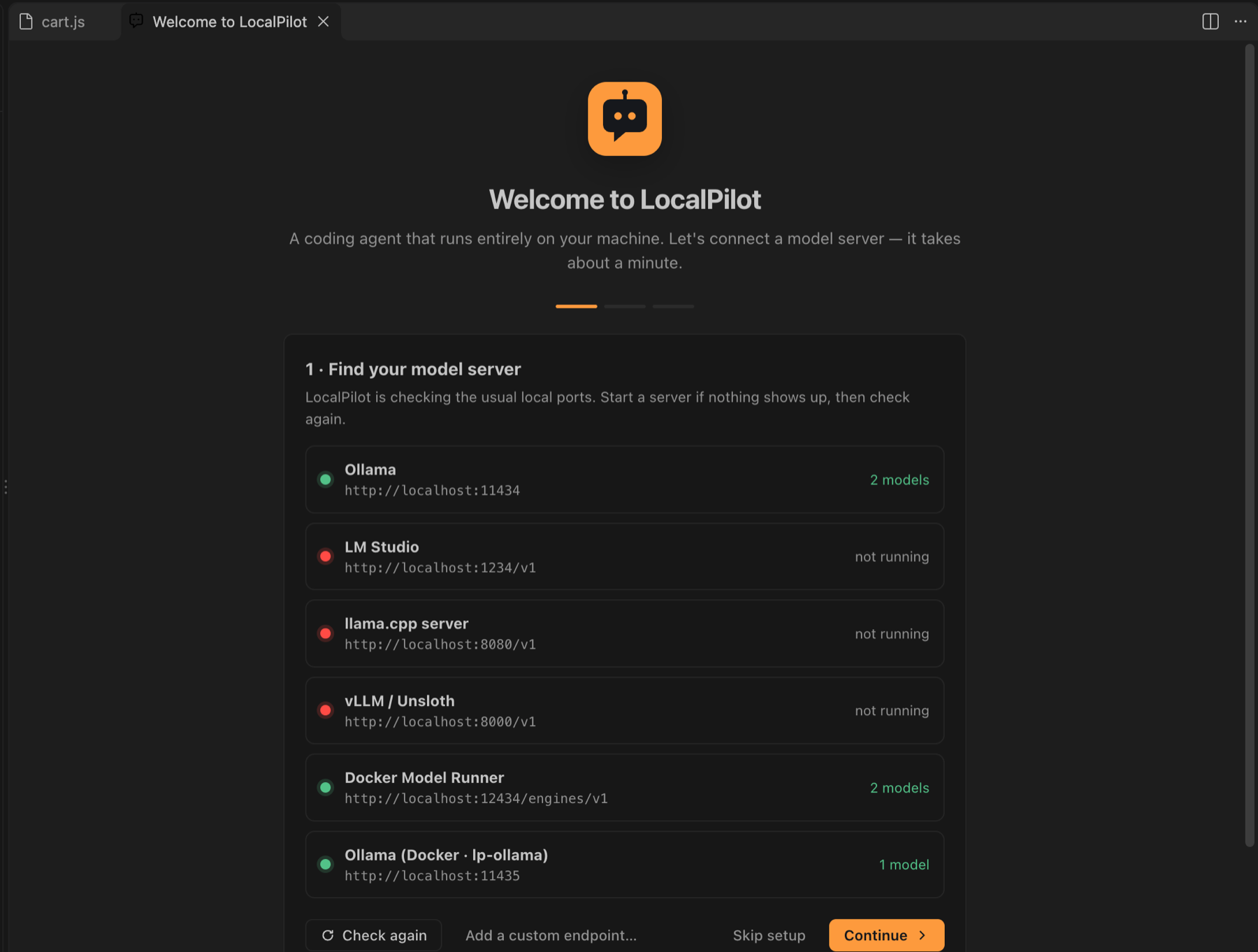
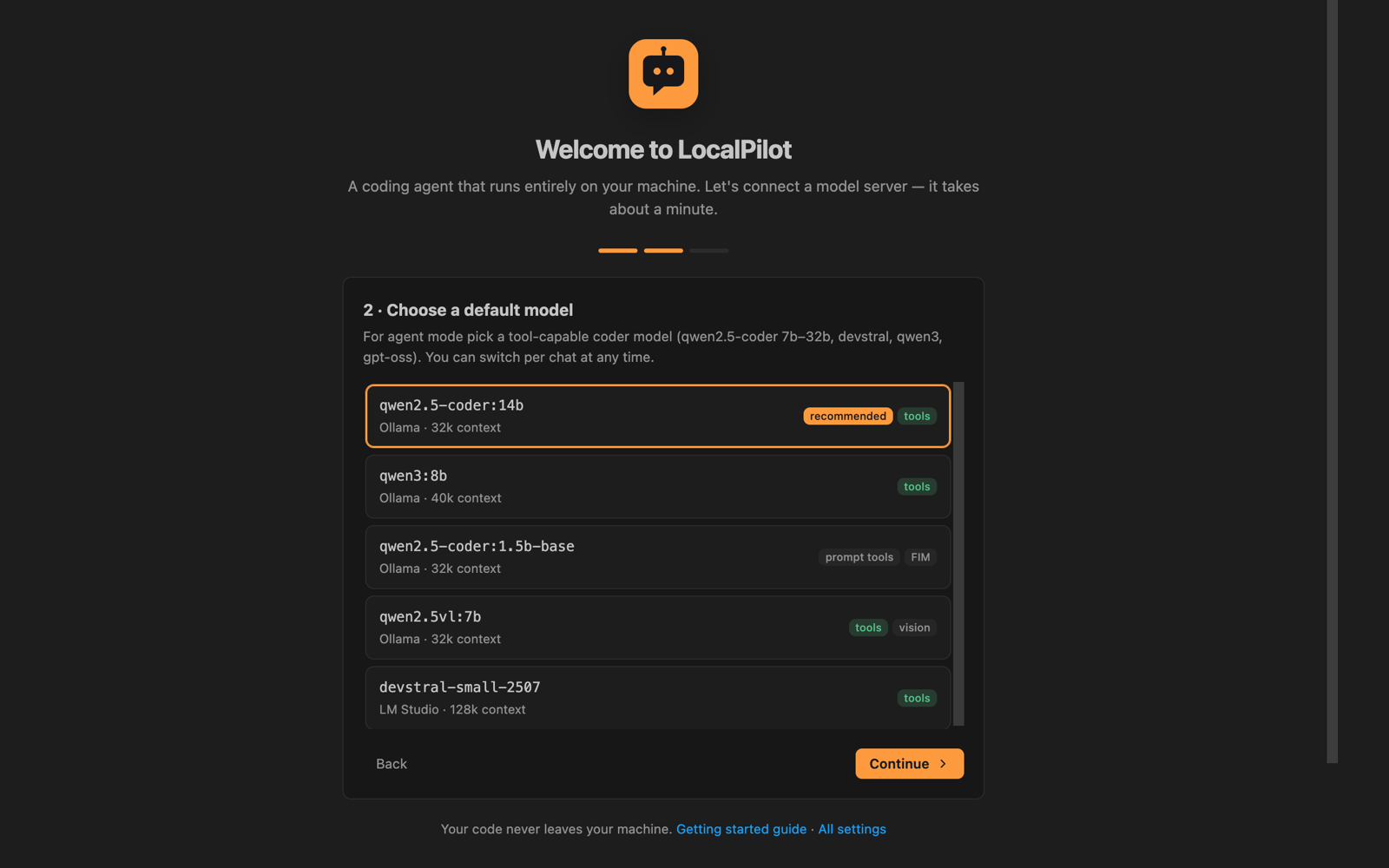
If no server is found the wizard shows one button for your situation — Install Ollama & starter model, Start Ollama & download starter model or Download starter model — with the models and download size it will fetch. One click downloads and installs Ollama in the background — no admin rights, no terminal — starts it, pulls the starter models with live progress, and moves you on to picking the default model.
Afterwards, pick a model from the picker at the bottom of the composer — or click the model name in the status bar. If you see No models found, click Set up automatically, or make sure a server is running and press Refresh. Settings → Models shows what fits your machine and lets you install more from the catalog; see Managing models.
4. Your first task
Switch to Agent mode and try:
Add input validation to the login form and write tests for it.
LocalPilot will read the relevant files, make edits, run diagnostics and report back. Review the files changed bar above the composer and choose Keep all or Undo all.
Next steps
- Learn the three modes: Agent, Ask & Plan
- Run several agents at once: Parallel agents
- Teach it your conventions: Skills & subagents
- Tune behaviour: Configuration