
Models & providers
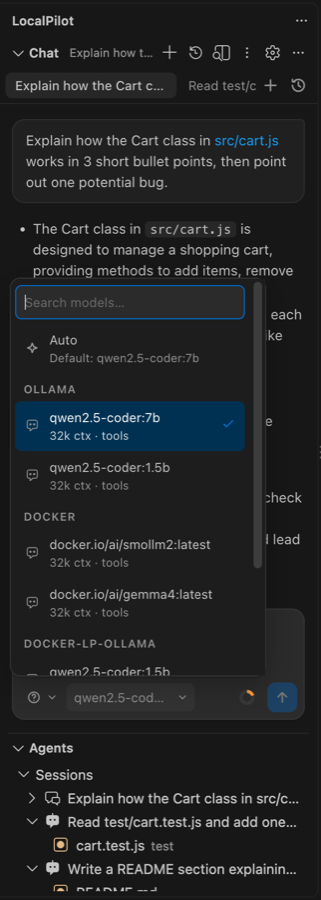
One-click model setup sized to your hardware, a model manager with catalog, enable/disable and remove, automatic per-task routing, and auto-detected providers — Ollama, LM Studio, llama.cpp, vLLM, Docker Model Runner or any OpenAI-compatible endpoint.
Provider types
type |
Protocol | Use for |
|---|---|---|
ollama |
Ollama native API (/api/chat, /api/generate, /api/tags, /api/show) |
Ollama. Full support for tools, thinking, FIM suffix, vision, num_ctx. |
openai |
OpenAI-compatible (/v1/chat/completions, /v1/completions, /v1/models) |
LM Studio, llama.cpp, vLLM, SGLang, LocalAI, Jan, OpenRouter, OpenAI, Azure OpenAI… |
Models are referenced as <providerId>/<modelId>, e.g. ollama/qwen2.5-coder:14b or lmstudio/qwen2.5-coder-14b-instruct.
Default providers
"localpilot.providers": [
  { "id": "ollama",   "type": "ollama", "baseUrl": "http://localhost:11434" },
  { "id": "lmstudio", "type": "openai", "baseUrl": "http://localhost:1234/v1" },
  { "id": "llamacpp", "type": "openai", "baseUrl": "http://localhost:8080/v1" },
  { "id": "vllm",     "type": "openai", "baseUrl": "http://localhost:8000/v1" }
]
Unreachable servers are skipped silently; models from all reachable servers are merged into one picker.
Auto-detection
You normally don’t have to configure anything. At startup and on every Refresh models, LocalPilot probes:
- the providers in your settings,
- the well-known local ports — Ollama
11434, LM Studio1234, llama.cpp8080, vLLM8000, Docker Model Runner12434, Jan1337, SGLang30000, KoboldCpp5001, - running Docker containers (
docker ps) whose image is a known model server —ollama/ollama,vllm/vllm-openai,ghcr.io/ggml-org/llama.cpp,localai/localai,huggingface/text-generation-inference,lmsysorg/sglang,docker/model-runner, KoboldCpp — using the published host port of each container.
Every server that answers and is not yet in localpilot.providers is added automatically (never removed or edited), and a notification tells you what was found. With no defaultModel set, Auto picks the best tool-capable coder model that fits this machine across all servers; if your configured default is offline, LocalPilot falls back to the best available one and offers to make it the default. If no server has any model at all, it offers automatic setup.
Automatic setup
If no model is reachable anywhere — fresh machine, server stopped, models deleted — LocalPilot offers to fix it in one click. The setup wizard shows a single situational button (Install Ollama & starter model / Start Ollama & download starter model / Download starter model) that names the models and download size and runs without further prompts; the same flow is behind Set up automatically in the chat, Settings → Models and the LocalPilot: Set Up Models Automatically command:
- Find a runtime. A running Ollama or Docker Model Runner is used as is. An installed-but-stopped Ollama is started (the menu-bar/tray app, or
ollama serve). With nothing installed, LocalPilot installs Ollama itself, in the background, without admin rights — it downloads the official build and shows byte-level progress: macOSOllama-darwin.zip→/Applications(or~/Applications), quarantine cleared, app launched; WindowsOllamaSetup.exerun silently (per-user install), tray app launched; Linux the officialollama-linux-<arch>.tar.zst(decoded by Node’s built-in zstd,.tgzfallback) unpacked into~/.local/share/localpilot/ollamaandollama servestarted — nosudo, no systemd needed. Only if that fails does it fall back to the interactive installer script in a terminal (Homebrew / winget /install.sh). -
Size the models to the machine. RAM, CPU cores and GPU memory are detected (Apple Silicon counts as unified memory) and turned into a model budget. The starter set is deliberately smallest-first so the agent is usable quickly and leaves room for a second model:
Budget Agent model Completions Images ≥ 9 GB (16 GB RAM+) gemma4:e4b(6.6 GB)starcoder2:3bthe Gemma 4 itself 4–9 GB (8 GB RAM) gemma4:e2b(4.6 GB, a little tight on 8 GB)— the Gemma 4 itself 2.5–4 GB llama3.2:3b— — < 2.5 GB llama3.2:1b/smollm2:360m— — Gemma 4 is a frontier-class small model with native tool calling, vision and optional thinking, so one download covers agent work, screenshots and Plan mode. Qwen models are no longer part of the starter set; they stay in the catalog if you prefer them.
- Download with progress (status bar, notification and the Models page), then set
defaultModel,inlineCompletion.modelandrouting.visionif they were empty.
Already-installed models are skipped, so the flow is safe to re-run. Turn the startup offer off with localpilot.models.autoSetup.
Managing models
Settings → Models (LocalPilot: Manage Models) is the model manager:
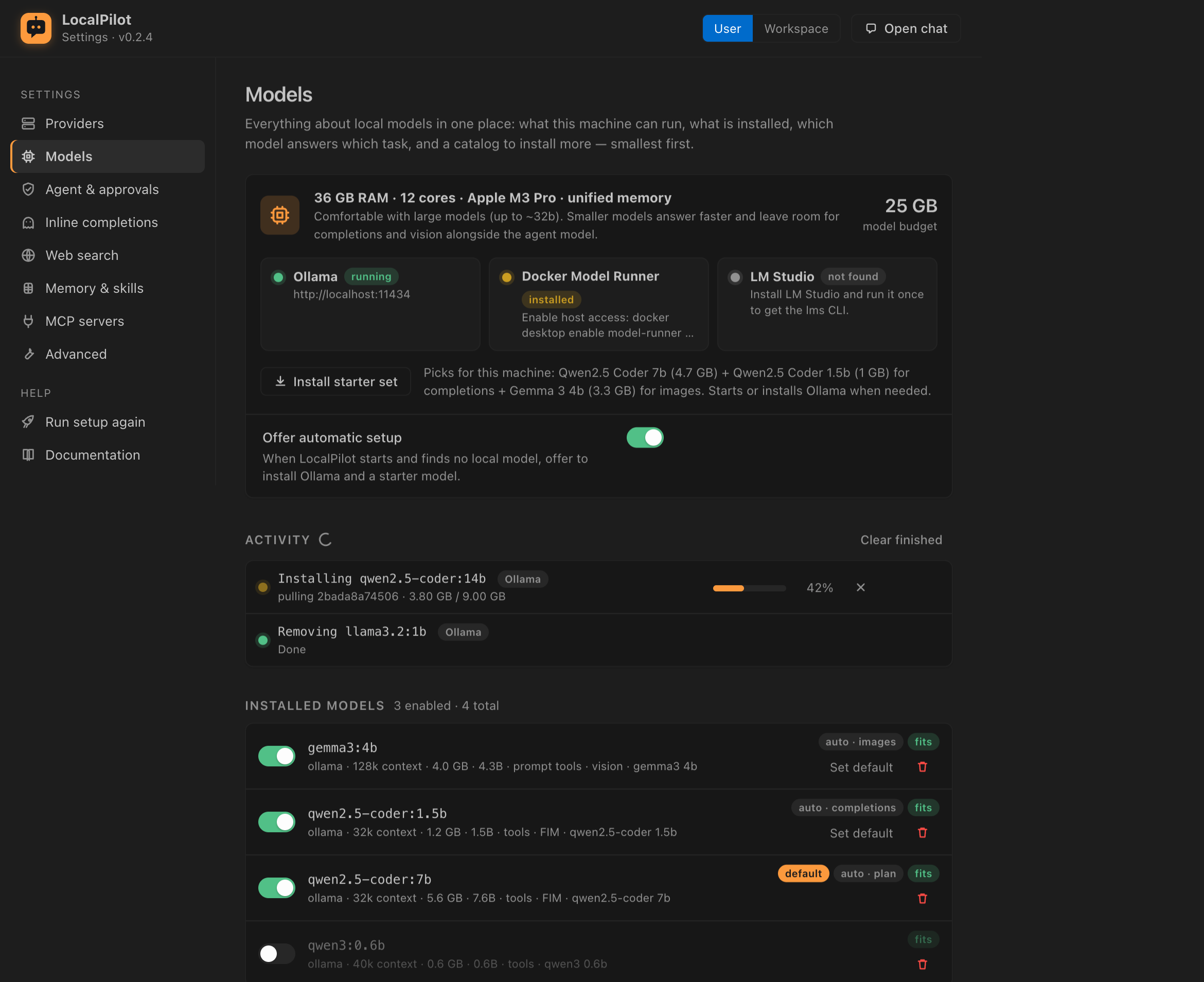
- This machine — detected RAM / GPU / cores, the resulting model budget and tier, and the state of each runtime (Ollama, Docker Model Runner, LM Studio: running / installed / not found) with Start and Install buttons for Ollama.
- Installed models — every model from every reachable provider with size, context, capabilities and the role the router would give it. Each row has an enable/disable switch (disabled models stay installed but disappear from pickers, routing and the status bar — stored in
localpilot.models.disabled), Set default, and Remove for Ollama and Docker Model Runner models (LM Studio models are deleted from the LM Studio app). - Routing — see below.
- Model catalog — curated families (Gemma 4, Nemotron 3.5 Bolt, Qwen2.5 Coder, Qwen3, Devstral, gpt-oss, Llama 3.x, Gemma 3, Qwen2.5 VL, Mistral Small, DeepSeek-R1, Codestral, StarCoder2, Phi-4 mini, SmolLM2) with every size annotated fits / tight / too big for this machine and a ★ on the recommended size per family. Pick where to install — Ollama (
ollama pull), Docker Model Runner (docker model pull) or LM Studio (lms get) — and watch the download inline; cancel any time. Filter by role or search.
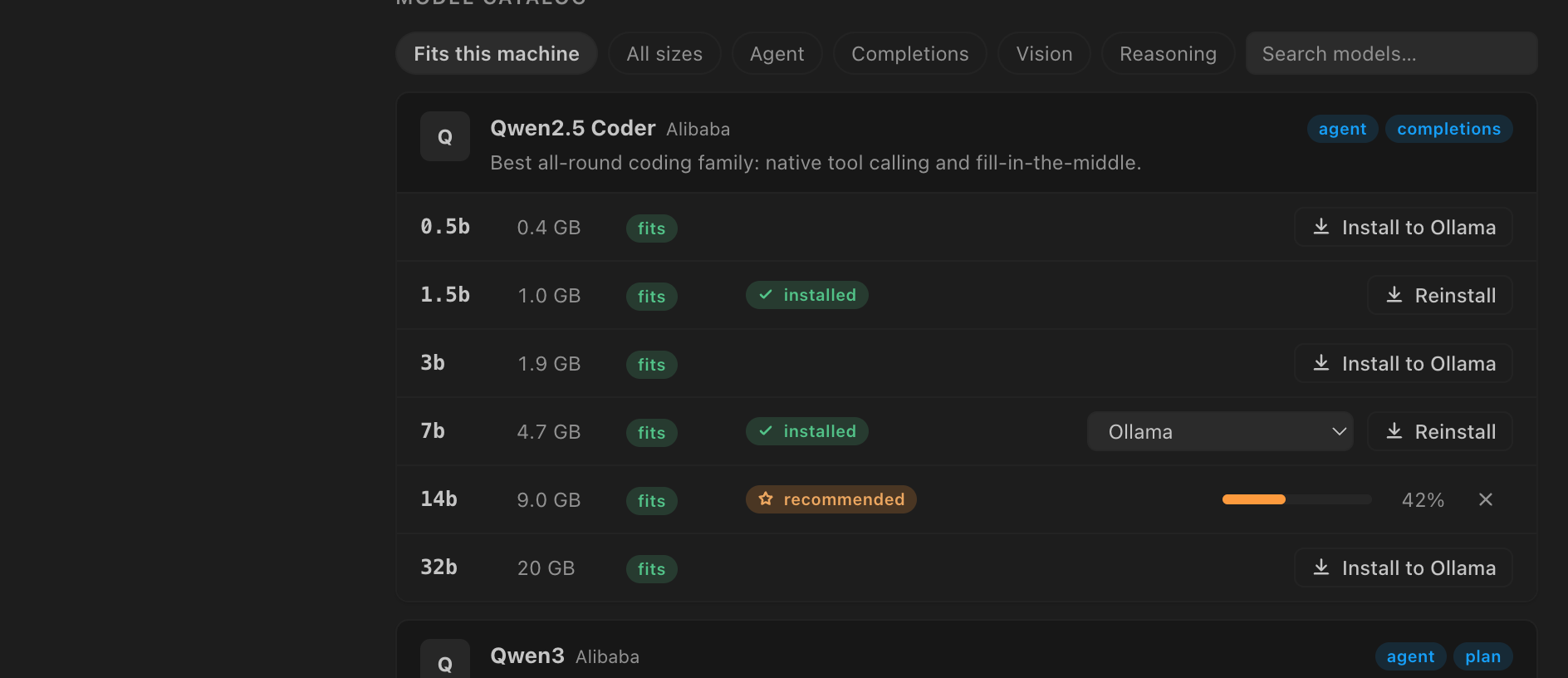
The same actions exist as commands: Install Model from Catalog…, Remove Local Model…, Enable / Disable Model…. Models pulled by hand (ollama pull …) show up on the next refresh.
Automatic routing
With localpilot.routing.enabled (default on) LocalPilot picks the model per task instead of using one model for everything:
| Task | Model used |
|---|---|
| Agent / chat turn | The session’s model, else localpilot.defaultModel, else the best tool-capable coder model that fits in memory |
| Turn with images | The session model if it can see; otherwise localpilot.routing.vision or the best installed vision model — just for that turn, the session keeps its model |
| Inline completions | localpilot.inlineCompletion.model, else the smallest FIM-capable model (latency matters more than size) |
| Plan mode | localpilot.routing.reasoning when set (e.g. ollama/qwen3:8b), else the session model |
Read-only subagents (explore, clarifier, researcher) |
localpilot.routing.fast when set, else the smallest tool-capable instruct model that fits — they run many short tool calls, often in parallel. session pins the session model |
Implementing subagents (coder, tester, debugger, docs) |
localpilot.routing.coding when set (e.g. a 32b coder while you chat with a 7b), else the session model |
| Chosen model offline or disabled | The best available model, with a status line explaining the substitution; the session switches to it |
Ranking considers capabilities (tools, FIM, vision), model family, parameter count and whether the model fits the machine’s budget, so a 32b model that spills out of memory loses to a 14b that doesn’t. The status bar shows the model that will actually answer.
Docker-based models
Docker Model Runner (Docker Desktop 4.40+ or docker model install-runner on Docker Engine) serves models through an OpenAI-compatible API:
docker model pull ai/qwen2.5-coder            # or any ai/* model, or hf.co/<repo>
docker desktop enable model-runner --tcp=12434   # one-time: allow access from the host
LocalPilot then finds it at http://localhost:12434/engines/v1 and lists its models under the docker provider (e.g. docker/docker.io/ai/qwen2.5-coder:latest, shown as qwen2.5-coder:latest in the picker). If the runner is active but host access is off, LocalPilot shows a one-click Enable prompt that runs the command above.
Model servers in containers work the same way as native ones — publish the port and LocalPilot picks them up:
docker run -d --name ollama -p 11434:11434 -v ollama:/root/.ollama ollama/ollama
docker run -d --name vllm -p 8000:8000 --gpus all vllm/vllm-openai --model Qwen/Qwen2.5-Coder-7B-Instruct
docker run -d --name llamacpp -p 8080:8080 -v ./models:/models ghcr.io/ggml-org/llama.cpp:server -m /models/model.gguf --host 0.0.0.0
Containers appear as providers named docker-<container> (e.g. vLLM (Docker · vllm)), so a non-standard host port such as -p 11435:11434 is handled automatically.
Adding a provider
The quickest way is Settings → Providers (gear icon in the chat toolbar): pick a preset or Custom endpoint, fill in the URL and optional API key, and press Test connection to confirm the server answers and see which models it exposes.
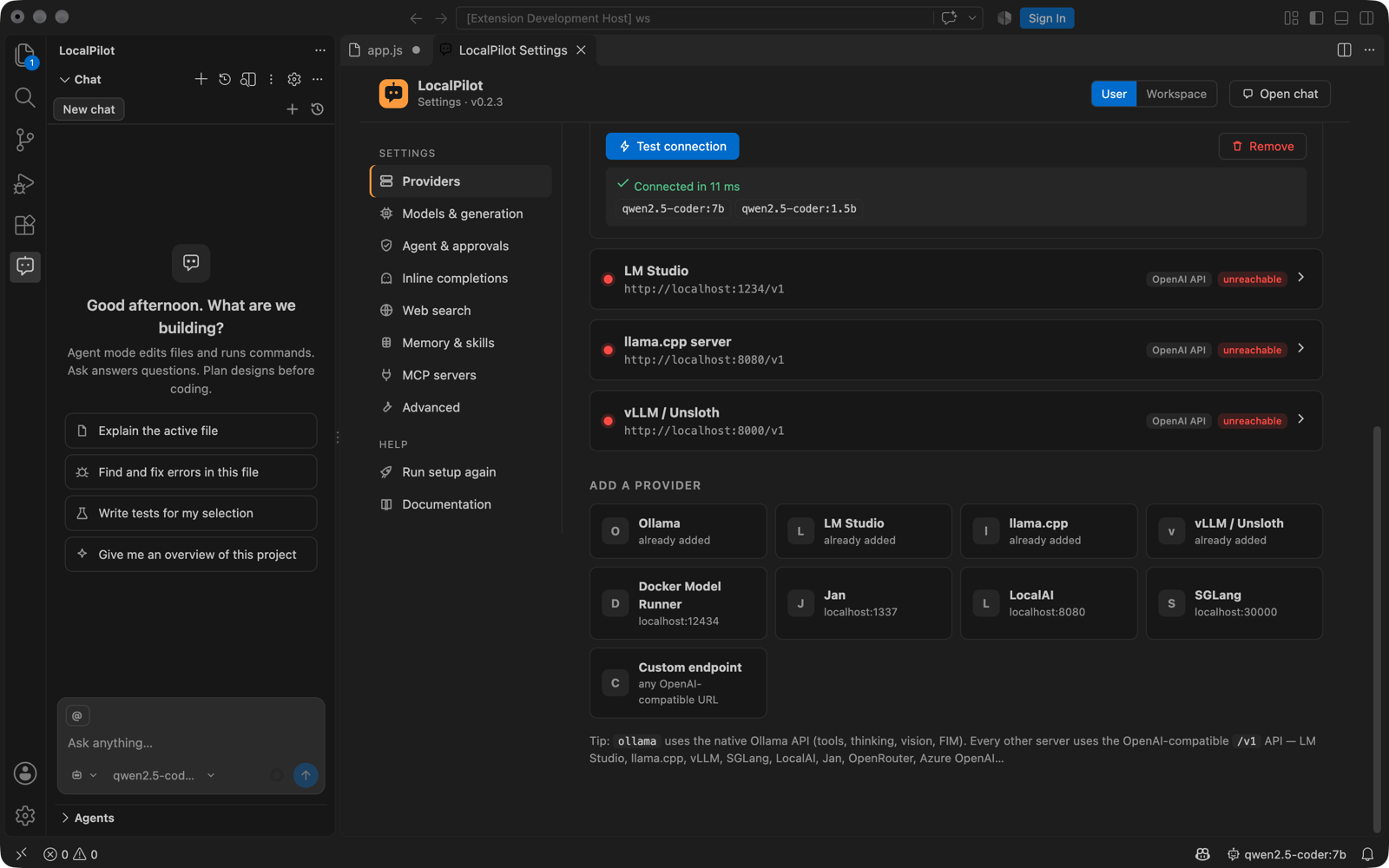
The same configuration lives in localpilot.providers if you prefer settings.json:
{
  "id": "homelab",
  "type": "openai",
  "displayName": "Homelab vLLM",
  "baseUrl": "http://10.0.0.5:8000/v1",
  "apiKey": "optional-token",
  "contextWindow": 131072,          // fallback if the server doesn't report it
  "models": ["Qwen/Qwen2.5-Coder-32B-Instruct"]  // for servers with no /models endpoint
}
Unsloth models
Unsloth is a fine-tuning toolkit; serve the result with one of the supported runtimes:
- GGUF export →
ollama create mymodel -f Modelfileorllama-server -m model.gguf --port 8080 - Merged HF weights →
vllm serve ./merged --port 8000
Then it appears automatically under the matching provider.
Capability detection
- Tool calling — read from Ollama’s
/api/showcapabilities or the server’s model metadata. Models without native tools fall back to a prompt-based protocol. - Vision — enables image attachments.
- FIM — used for inline completions (
insertcapability or coder-model name heuristics). - Context window — read from model metadata; capped by
localpilot.contextWindow.
Recommended models
| Task | Models |
|---|---|
| Agentic coding (tools) | gemma4:e2b / :e4b / :12b (recommended), nemotron-3.5-bolt:e4b, devstral, gpt-oss, mistral-small, qwen3 |
| Inline completions (FIM) | starcoder2:3b, codestral, qwen2.5-coder:1.5b / :7b-base, deepseek-coder |
| Screenshots / vision | gemma4 (any size), nemotron-3.5-bolt, qwen2.5vl, llava, gemma3, pixtral |
| Reasoning | gemma4, gpt-oss, qwen3, deepseek-r1 (enable localpilot.thinking) |
Tip: keep localpilot.contextWindow at 32k+ for agent work; Ollama models default to 2–4k unless num_ctx is raised, which LocalPilot does for you.