
Terminal & CLI
Watch the agent run commands in a branded VS Code terminal, hand terminal output to the chat, and run the full LocalPilot agent from any shell with the `localpilot` CLI.
The agent in your terminal
When the agent runs a command (run_command), it executes in a visible, branded LocalPilot Agent terminal through VS Code’s shell integration. You watch the command run live — with the shell’s own prompt, colours and exit-code markers — while the agent receives the captured output and exit code.
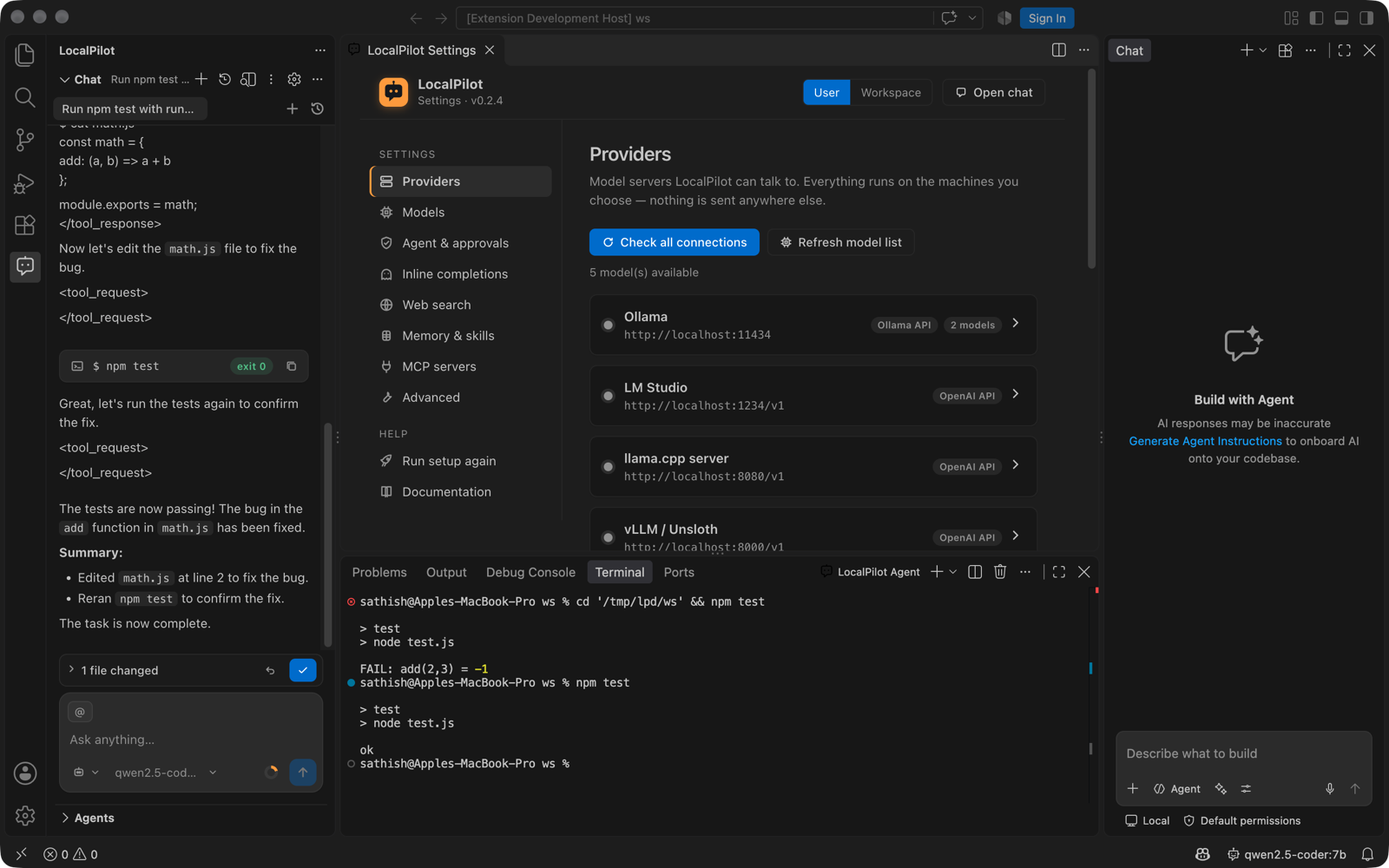
- One agent terminal per chat session, reused across commands.
- Output is captured through shell integration, so it is exactly what you see; ANSI colours and shell-integration markers are stripped before it reaches the model.
- Stopping the chat sends Ctrl+C to the running command; long commands time out (
timeout_seconds, max 10 minutes). - If the shell has no integration (or
localpilot.terminal.runInIntegratedTerminalis off), the command runs in a hidden process instead — same result, just not visible. background: truecommands (dev servers, watchers) open their own terminal and are not awaited.
| Setting | Default | Purpose |
|---|---|---|
localpilot.terminal.runInIntegratedTerminal |
true |
Run agent commands in the visible LocalPilot Agent terminal |
localpilot.terminal.reveal |
true |
Show the terminal panel (without stealing focus) when a command runs |
Terminal output as context
LocalPilot records the commands you run in any VS Code terminal (via shell integration), so the last command and its output are one click away:
- Right-click a terminal → LocalPilot: Explain Terminal Output, Fix Failed Command or Add Terminal Output to Chat.
- Type
@terminalin the chat to attach the last command + output of the active terminal. - Fix Failed Command picks the most recent command that exited non-zero, opens an Agent chat and asks it to find the cause, fix it and re-run the command.
- ⌘⌥K (Ctrl+Alt+K) in a terminal still generates a shell command from a description.
The localpilot CLI
localpilot is the complete LocalPilot agent for the shell — the same agent loop, tools, skills, memory, MCP servers and change tracking as the extension, running under Node against your local model servers. Nothing is sent anywhere else.
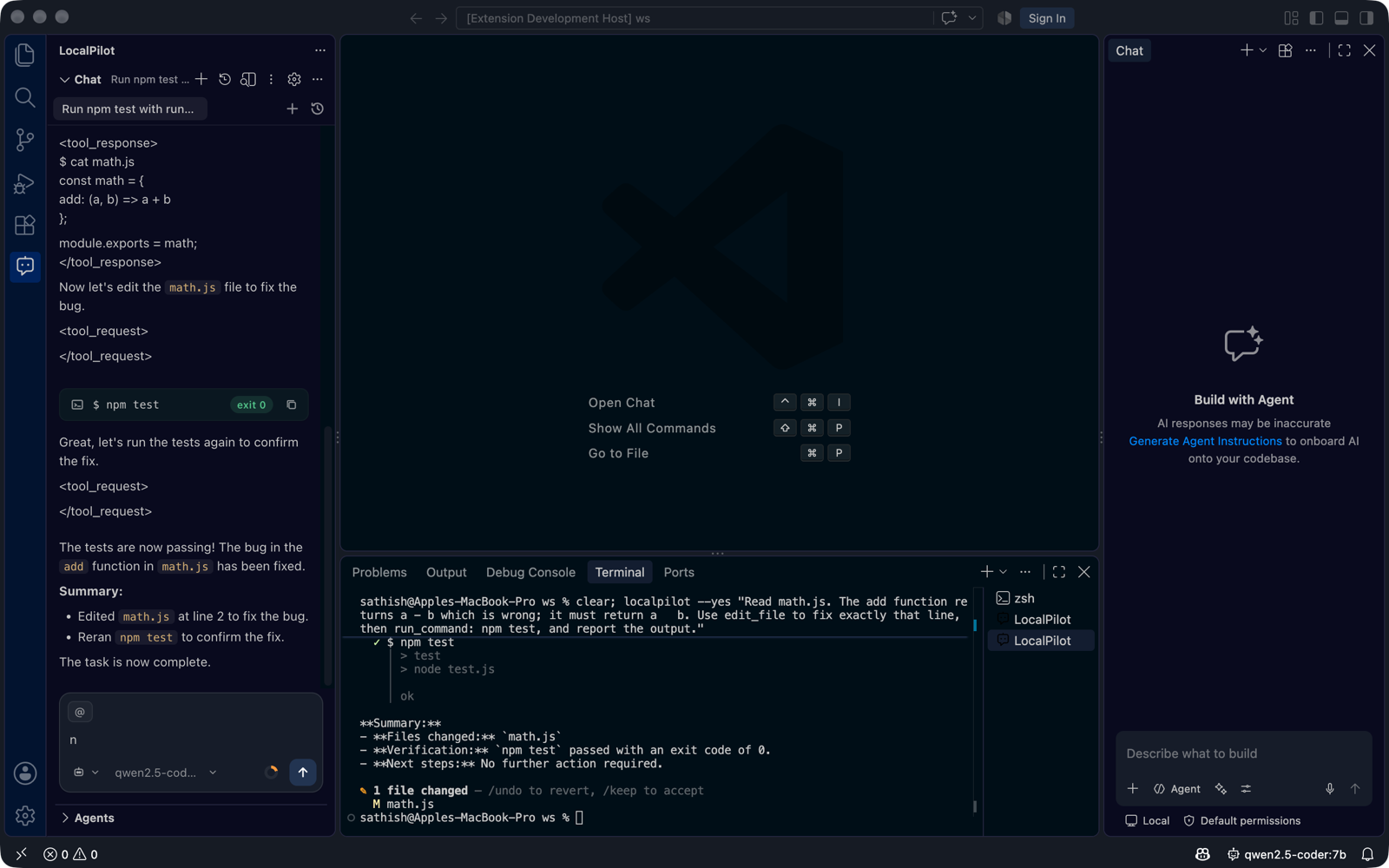
Getting it
- Inside VS Code — LocalPilot: Open LocalPilot Terminal (also in the chat toolbar’s ⋯ menu and the terminal + dropdown as the LocalPilot profile). The CLI is on
PATHin that terminal; nothing to install. - Everywhere — LocalPilot: Install ‘localpilot’ CLI in PATH writes
~/.local/bin/localpilot(Windows:%USERPROFILE%\bin\localpilot.cmd). The shim finds the newest installed LocalPilot after updates and runs withnode, or with VS Code’s own runtime when Node isn’t installed.
Usage
localpilot "fix the failing tests in src/api"     # one task in agent mode, then exit
localpilot                                        # interactive session (REPL)
localpilot --ask "how does the retry logic work?"
localpilot --plan "migrate the auth module to JWT"
localpilot -f src/db.ts "add connection pooling"   # attach files (path#L10-L20 for a range)
localpilot --yes "update all deps and run tests"   # auto-approve commands/edits (CI, scripts)
localpilot -p "summarise this repo" > NOTES.md     # print only the final answer
git diff | localpilot --ask "review this diff"     # piped stdin becomes the prompt
localpilot -m ollama/qwen3:8b "…"                   # pick a model for this run
localpilot models                                 # models from every reachable server
localpilot doctor                                 # servers, settings, skills, MCP, ripgrep
localpilot --ide "…"  ·  --settings  ·  --setup   # hand off to VS Code
In a session: /mode agent|ask|plan, /model <name>, /models, /changes, /undo, /keep, /file <path>, /clear, /doctor, /exit. Ctrl+C stops the current run; press it again to quit.
Approvals
Every command, file edit, delete and network call goes through the same approval policies as the extension (localpilot.approvals.*). When a policy says ask, the CLI shows the command or diff and prompts [y]es · [n]o · [a]lways this session. --yes approves everything; without a TTY (CI) anything that needs approval is denied unless --yes is given.
Edits are tracked per run: a one-shot run prints the changed files at the end; in a session /undo reverts them and /keep accepts.
Settings
The CLI reads, in order: VS Code’s user settings.json, the workspace’s .vscode/settings.json, ~/.localpilot/config.json, then flags. So a model server configured in LocalPilot Settings is already known to the CLI. Changes made from the CLI (/model) are saved to ~/.localpilot/config.json, never to VS Code’s settings. Logs go to ~/.localpilot/cli.log.
~/.localpilot/config.json uses the same keys without the localpilot. prefix:
{
  "providers": [{ "id": "ollama", "type": "ollama", "baseUrl": "http://localhost:11434" }],
  "defaultModel": "ollama/qwen2.5-coder:7b",
  "approvals": { "terminal": "ask", "write": "always" }
}
Deep links
The CLI’s --ide, --settings and --setup flags use LocalPilot’s URI handler, which you can call from anything: vscode://localpilot.localpilot-agent/run?mode=agent&prompt=…, /new, /settings?section=providers, /setup, /terminal?run=localpilot%20--help.