
Dashboard, metrics & logs
Local usage metrics, model tuning, provider health and a searchable live log. Stored in local files on your machine; the extension uploads nothing.
LocalPilot: Open Dashboard shows what LocalPilot has been doing on this machine. You can also open it from the status-bar menu, the chat title bar menu and Settings → Dashboard, the first entry in the settings sidebar.
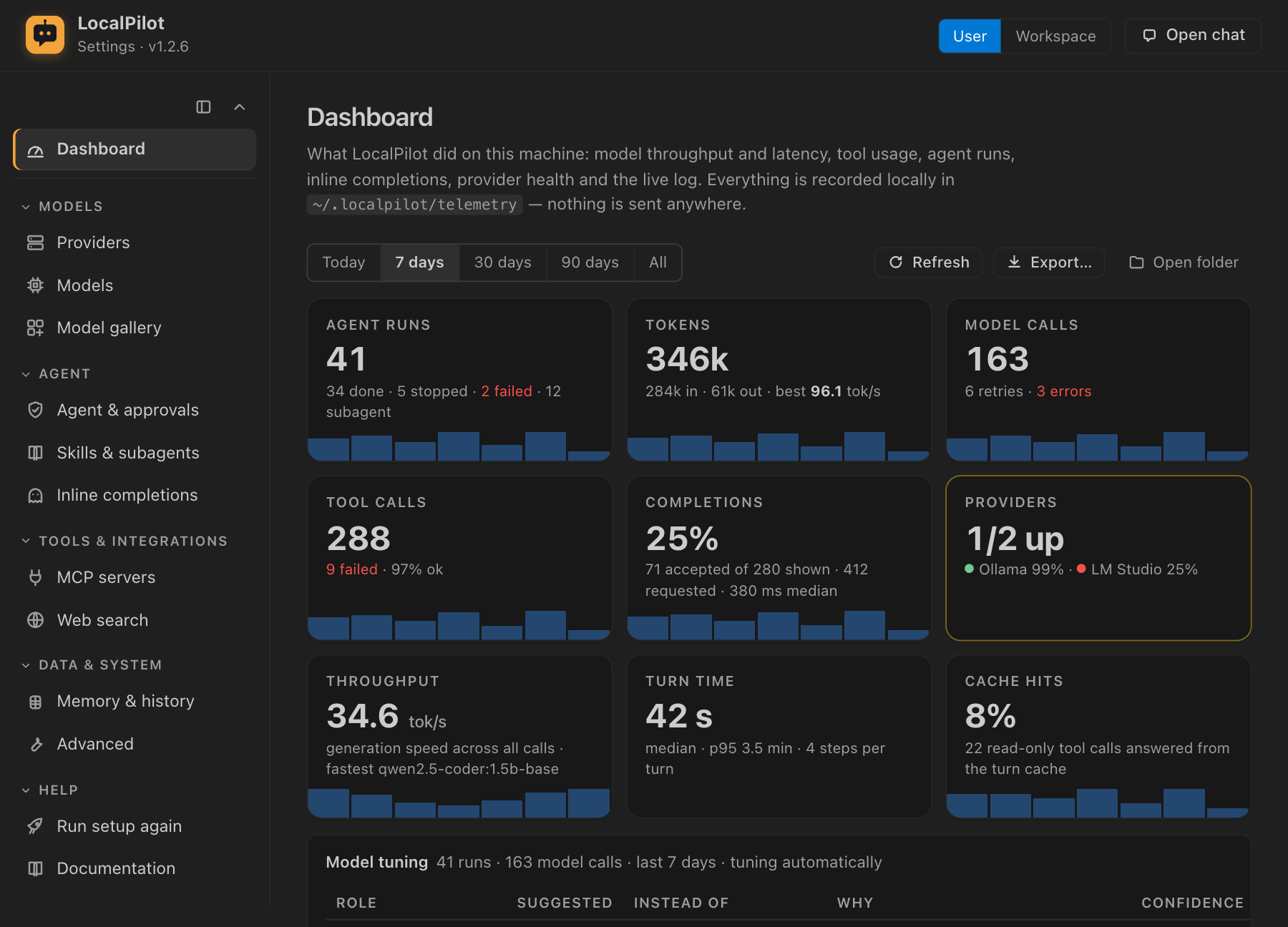
Everything on the page is computed from local JSONL files in ~/.localpilot/telemetry (or, if you turned it on, the Redis server you configured). The extension does not upload these metrics or send them to anyone else. See Privacy for every network call the extension makes.
What you see
Pick a range: Today, 7 days, 30 days, 90 days or All. While the page is open and visible, it refreshes every 15 seconds.
| Card | What it tells you |
|---|---|
| Agent runs | Turns finished, stopped and failed, how many were subagents, and a per-day bar chart. |
| Tokens | Prompt and completion tokens as reported by the server, plus the fastest model’s tok/s. |
| Model calls | Requests made, retries (stalls, connection drops, empty replies) and hard errors. |
| Tool calls | Tool executions and their failure rate. |
| Completions | Inline-completion acceptance rate (accepted ÷ shown), requests and median latency. |
| Providers | How many configured servers are reachable now, and each one’s uptime over the range. |
| Throughput | Completion tokens per second of generation across all calls in the range, and the fastest model. |
| Turn time | Median and 95th-percentile duration of an agent turn, and the median number of model steps. |
| Cache hits | Share of tool calls answered from the per-turn read cache (identical reads in one turn run once). |
Charts follow the cards. They are hidden for a single-day range, where the counters cover it. Hover any bar or point for the exact value. Colours come from your VS Code theme’s chart palette.
- Activity: model calls, tool calls, agent runs and errors per day.
- Tokens: prompt tokens stacked on completion tokens, per day.
- Generation speed: tok/s per day.
- Completions: shown vs accepted per day.
- Run outcomes and Tool reliability: donuts of done / stopped / failed runs and succeeded / cached / failed tool calls.
- Activity by hour: when the machine is busiest, in local time.
Tables follow the charts:
- Models: calls, tokens in and out, generation speed (tok/s), time to first token and whole-request time (median and 95th percentile), and errors.
- Runs by mode: Agent, Multitask, Debug, Ask and Plan, with outcomes, steps per run, duration and tool calls.
- Tools: per tool, calls, failures, cached hits, duration and share of all calls.
- Provider health: up or down, last error, uptime % and probe latency. LocalPilot checks providers whenever it discovers models: at start-up, on refresh, and every 30 s while the model picker is open.
- Inline completions: requested, shown, accepted, empty and failed, plus latency and acceptance by language.
- Isolated worktrees: how many runs were isolated, and worktrees created, applied (with files touched), discarded and conflicted.
- Subagents: per persona (coder, explore, tester…), runs, failures, duration and tool calls.
- Recent problems: the latest model errors, failed runs and unreachable providers.
Model tuning
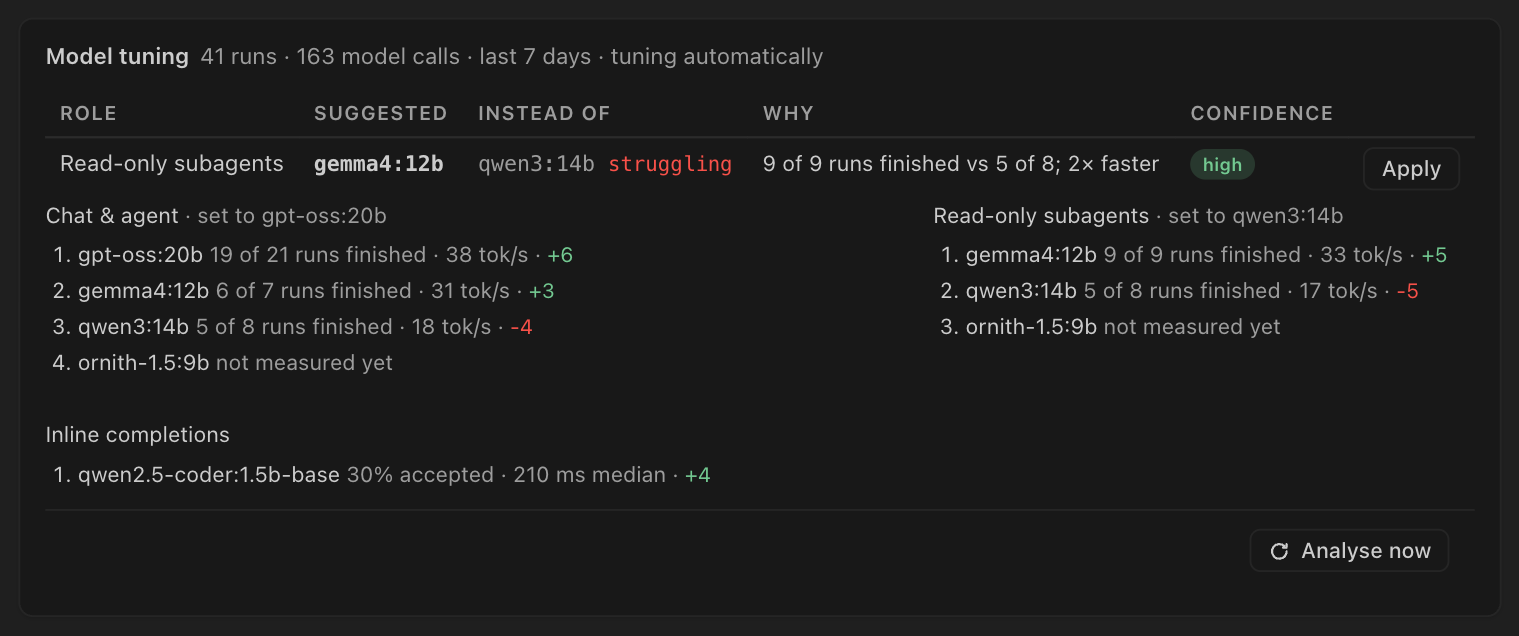
The Model tuning card shows what LocalPilot has learned about your installed models from local usage. It appears when localpilot.models.autoTune is auto or suggest and there is at least one model to rank. The header shows how many runs and model calls were analysed, the window (last 14 days) and the mode (tuning automatically or suggesting only).
The card has four parts:
- Suggestions. A table of changes LocalPilot recommends: role, suggested model, the model it would replace (marked struggling if that model keeps failing), the reason and a confidence badge (low, medium or high). Press Apply to write the suggestion to the role setting. Auto uses it means the setting is empty and Auto routing already picks that model, so there is nothing to write.
- Per-role ranking. For each role (Chat & agent, Plan mode, Coding subagents, Read-only subagents, Inline completions, Images), the top installed models with their evidence. Evidence reads like “N% of N runs finished · N tok/s”. The learned bonus or penalty is shown in green or red. Models without data show not measured yet.
- Recent automatic changes. The last settings LocalPilot changed in
automode, with the new value and the time. - Analyse now. Re-reads the telemetry and updates the card.
To undo an automatic change, use Undo in the notification that announced it, or set the role back in Settings → Models → Routing. To stop automatic changes, set localpilot.models.autoTune to suggest or off. For how the scoring and guardrails work, see Learning from your usage.
Logs
The Logs card mirrors the LocalPilot output channel. Filter by minimum level, search, and keep Follow on to stream new lines as they are written. Open log file opens today’s file (localpilot-YYYY-MM-DD.log) in an editor. Output channel jumps to the VS Code panel.
The CLI writes its own log (localpilot --log-file). Its runs still count in the metrics, because the extension and the CLI share the same telemetry folder.
Telemetry settings
| Setting | Default | Meaning |
|---|---|---|
localpilot.telemetry.enabled |
true |
Record usage metrics locally. Turning it off stops recording and also stops learning from usage. The log is still mirrored for the viewer. |
localpilot.telemetry.retentionDays |
30 |
Days of metrics and log files to keep. Older files are deleted on start-up and at most every 6 hours after that. 0 keeps everything. |
localpilot.storage.redis.enabled |
false |
Keep events and the log in Redis instead of files (see Configuration). The storage line under the settings says which backend is in use, and shows Redis unreachable — using files while it falls back. |
With Redis on, the data goes to the server you configured rather than staying in local files. With Redis Stack, every model, tool, run, health and completion metric is also a time series; the event stream keeps every event, while a series keeps one value per millisecond.
Export… writes every recorded event plus the current log buffer to a JSON file you choose. Delete all recorded data… removes the folder’s contents after you confirm.
What exactly is stored
Each event is one line of JSON in events-YYYY-MM-DD.jsonl:
| Event | Fields |
|---|---|
model |
session id, model, provider, mode, depth, prompt/completion tokens, time to first token, duration, outcome (ok, retry, error, aborted) and the error kind |
tool |
session id, tool name, mode, duration, error flag, cached flag |
run |
session id, mode, model, depth (0 = the chat, 1+ = subagent), subagent name and routing role, outcome (done, stopped, failed), duration, steps, tool calls, tokens, isolated flag |
completion |
action (requested, shown, cached, accepted, empty, error), model, language, duration |
health |
provider id, reachable, probe duration, number of models or the error |
worktree |
create, apply (files, conflicts) or discard |
Prompts, file contents, tool arguments and tool results are never recorded. Events hold only names, counts and timings. The log file can contain error messages from model servers and tools.
The LocalPilot website (not the extension) uses Google Analytics for page views. Details are on the Privacy page.